Define metrics and winning direction
Create meaningful measurement definitions and map provider metrics.
A metric is an outcome your team tracks, such as completed orders or revenue. Create reusable metrics before linking them to ideas and experiments.
Add a metric
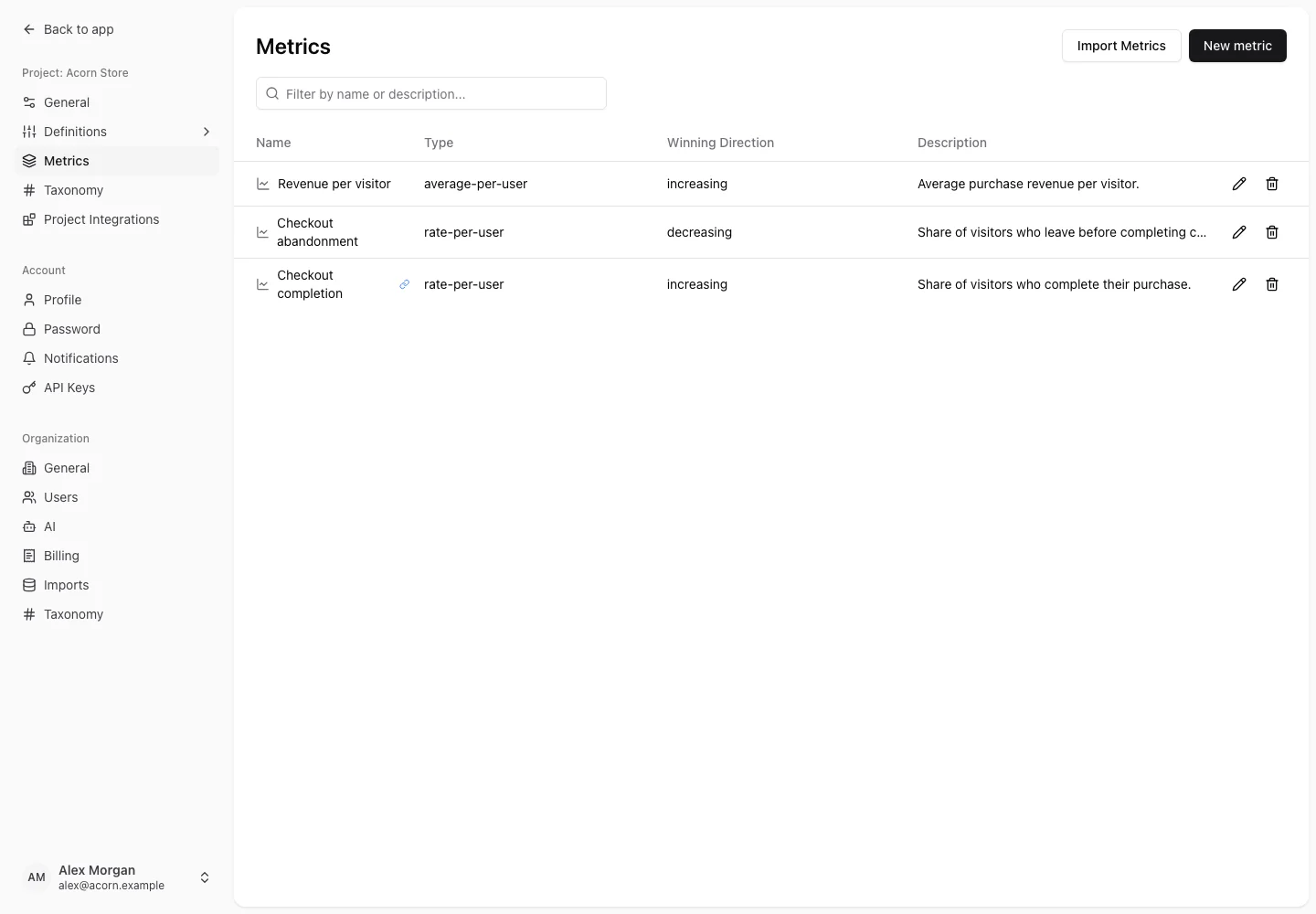
- Select the project and open Settings → Project → Metrics.
- Choose New metric and enter its name and description.
- Select the metric type and winning direction.
- Save, then link it to the appropriate idea or experiment.
Winning direction records whether a higher or lower value is preferable. A metric's definition matters: a rate, count, and monetary value are different measurements. Use the type that matches the underlying provider data.
Import and map metrics
Use the metric import action when a connected provider supports discovery. Review the external metric you select instead of relying only on similar names. A linked indicator identifies a metric connected to a provider.
For experiment reporting, the primary metric and every provider variation must be mapped correctly. The current fixed-horizon statistical report supports rate-per-user primary metrics. Other metric definitions can be stored, but do not assume every type has statistical analysis support.
Change a definition deliberately
Editing a name or description helps explain the existing measurement. Changing its type, winning direction, or provider mapping changes how teammates understand it. Review connected experiments and their result status after such a change.
If results show Primary metric is not supported yet or Result mapping is incomplete, follow result troubleshooting.